Version 1.6.0 · native PDF/X-1a, X-3 and X-4 · no Ghostscript · Windows 10/11 · .NET 8
Professional PDF imposition for modern print shops
Lay out pages on press sheets with surgical precision. An in-house export engine —
native PDF/X-1a, X-3 and X-4 with ICC conversion, no Ghostscript — page thumbnails with edits
(rotate, grayscale), a guillotine cutting guide, QR codes,
hot folders, saddle-stitch N-up, gatefold, saddle stitch & perfect-bound bindings —
all in one fast desktop app.
all of PDF/X, ink scan & grayscale without Ghostscript
30 days
full-feature trial
Preflight OK
PDF/X-4 · 12 sheets
Export ready
SRA3 · 2×1 · creep 0.13mm
Digital print shopsOffset housesDTP studios24/7 hot foldersSelf-publishingPhoto booksBrochures & catalogsBusiness cards gang-runMagazinesBooksDigital print shopsOffset housesDTP studios24/7 hot foldersSelf-publishingPhoto booksBrochures & catalogsBusiness cards gang-runMagazinesBooks
★ What’s new 1.6.0
From the MIS job ticket straight onto the sheet — version 1.6.0
Three bodies of work.Hot folders stop being blind to what the shop already knows: they read CIP4 job tickets — JDF 1.x and XJDF 2.x — so finished size, press sheet, binding and sidedness arrive from the MIS instead of being retyped. And they stop needing somebody logged in: they install as a Windows service, with a domain account for network folders and restart on failure. The second thread is preflight grown by ten checks a prepress department expects to find — page rotation, encryption, line-art resolution, the All colorant that prints on every plate, plate count against the press — plus two new repairs and both preflight windows rebuilt around the decision they exist to support. The third is independence finished off: all three PDF/X standards are packaged by the in-house engine, in hot folders too, where a PDF/X configuration previously refused to save without a path to Ghostscript — a tool we do not distribute.
JDF and XJDF job tickets ★
A hot folder reads the CIP4 tickets your MIS already writes for every job: finished size, press sheet, binding, sidedness and which file to print. A ticket is not the work — it describes the work and names the file that is. The folder’s template stays: a ticket overrides only what it states, and every override appears in the log with the value before and after. Both generations, both ways JDF 1.x states a value, dimensions in points converted for you. A binding the program cannot impose is named, never approximated.
Hot folders as a Windows service ★
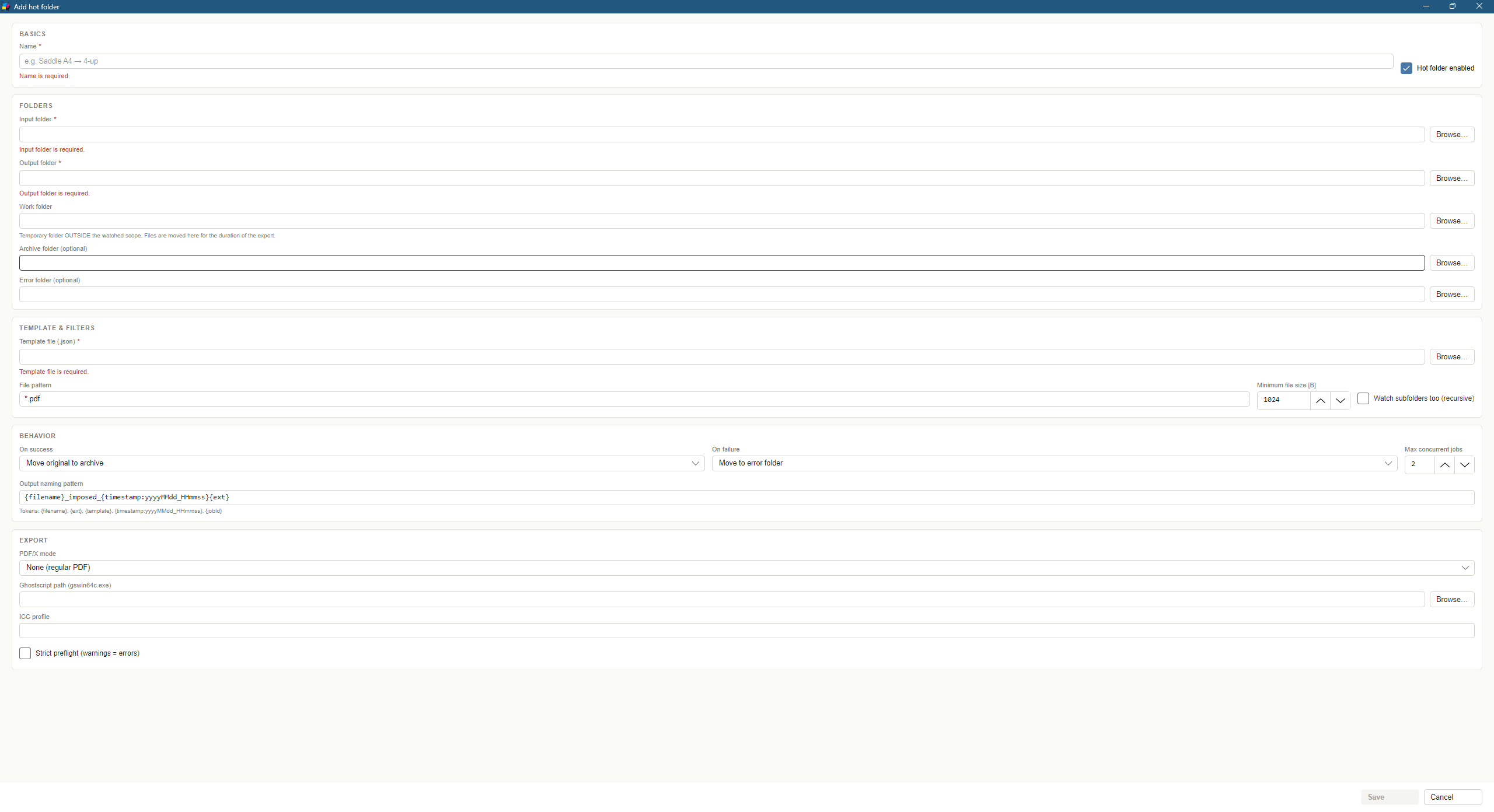
A shop expects a file dropped at 04:00 to be imposed at 04:00. Run from the window, a hot folder stopped at log-off; as a service it keeps going and comes back after a reboot. Install from the hot folder manager or the command line, with a domain account for folders on a network share and restart on failure. The service reads the same configuration and licence as the program — the path is captured at install time.
All of PDF/X without Ghostscript ★
X-1a and X-3 are now packaged by the native engine — as X-4 has been since 1.5.0. No PDF/X standard requires an external, separately-licensed tool any more. Both are defined on PDF 1.4 and so forbid live transparency: inert constructs (fully opaque groups, /ca 1, Normal blend — left behind by every file that passed through Illustrator or InDesign) are removed by the engine itself, while a file whose transparency actually paints is refused by name rather than silently turned from vector text into pixels. X-1a colour is verified against the written file, not assumed. Details in the changelog →
Preflight that advises — and listens ★
The “what to fix first” panel gave generic advice for 47 of 60 findings — the advice vocabulary had drifted from the check codes, and nobody noticed because each side was internally consistent. Every finding now carries its own specific imperative. On top of that, the shop decides what each check is worth, including switching it off: a printer trapping in the RIP silences the trapping advisory, one running CMYK-only raises RGB to an error. A report can finally be saved and sent to the customer, with pages folded into ranges. Strict mode also stopped refusing ordinary booklets.
Live sheet preview ★
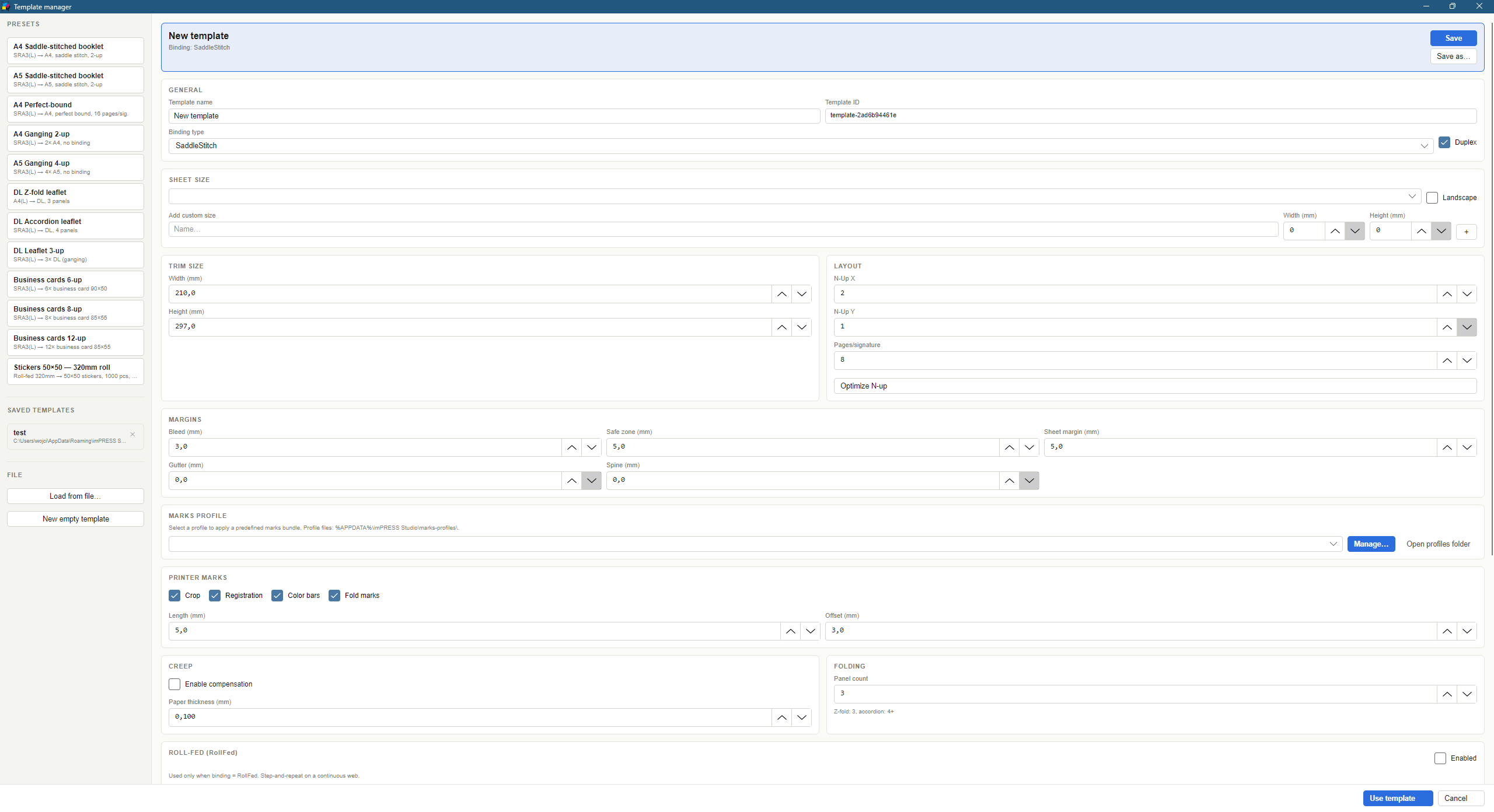
A third column in the template manager draws a schematic of the first sheet — item slots with page numbers, blank slots, fold lines and the usable area — refreshed as you edit, with per-sheet yield (items × coverage) underneath. It is planned by the same strategies that plan production, so it has no way to lie. Validation runs live: the error banner appears and clears as you edit a field. Template manager →
Folds sized by the product ★
Z-fold, accordion and gatefold take the panel width from the product, not from dividing the sheet by the panel count. A DL leaflet on SRA3 used to come out with panels 143 mm apart — a folder creasing at 99 mm cut straight through the artwork. You can enter one panel or the unfolded product ("A4 folded to DL"), and the card shows what that resolves to. Fold marks are finally drawn for leaflets too. Fold geometry →
Starting points, not jargon ★
Presets are now named after the product and its finished size — "DL leaflet — Z-fold, 3 panels", "Business cards 85×55 mm — 12 per sheet" — instead of the mechanism ("A4 Ganging 2-up"), and split under four headings: booklets, folded leaflets, multiple items per sheet, labels. Every binding finally has a starting point (wire-o and gatefold were added), and the item size is picked from the standard-size list, just like the sheet.
Suggestions that learn ★
Suggestions are ranked by six weighted factors, every entry explains itself with a checklist, and the engine remembers what your shop picks for a given size. New: bleed detection — a file handing over its MediaBox instead of a TrimBox (an 85×55 card arriving as 91×61) is read correctly and the card says what was assumed. Thresholds scale with the format, so posters are findable at last, and your own products sit alongside the built-in ones.
Prepress preflight ★
Checks that catch the defects which ruin a whole run rather than one copy: total ink coverage read from the content stream (not from a raster, which under-reports threefold), the safe zone for text near the trim line, black build in both directions, trapping, one spot colour spelled several ways, layers that disagree with their own print state, and image codecs a RIP may refuse. The thresholds are a press profile — five built in, from offset to wide format.
Consecutive-page ganging ★
N-up can finally carry consecutive document pages instead of the same page over and over: a 5-page job 2-up lands as 1+2, 3+4, 5. With duplex each slot becomes its own leaf. Existing templates are unchanged to the millimetre — the default mode is still repeat-the-item. On top of that, page order is set by dragging thumbnails, and the change carries through to planning, export and save.
Features
Everything prepress needs
Full control over page layout, marks, and export — without third-party plugins or full Adobe suites.
Roll-fed + Summa OPOS ★
Sticker and label production on a continuous roll: step-and-repeat with variable repeat, automatic multi-segment splitting, basic auto-rotation nesting (0°/90°), Summa OPOS / OPOS-XY plotter markers for print&cut workflows, logo overlay (PNG/JPG/PDF) on every sheet. Built for latex / solvent printers + Summa cutter pipelines.
Hot folders
Point at an input folder — the app detects every dropped PDF, applies the chosen template, and writes the imposed sheet to the output folder. Multiple parallel hot folders, post-crash recovery, retry, original archiving. Built for "operator drops a PDF, ripper picks up the imposed sheet" workflows.
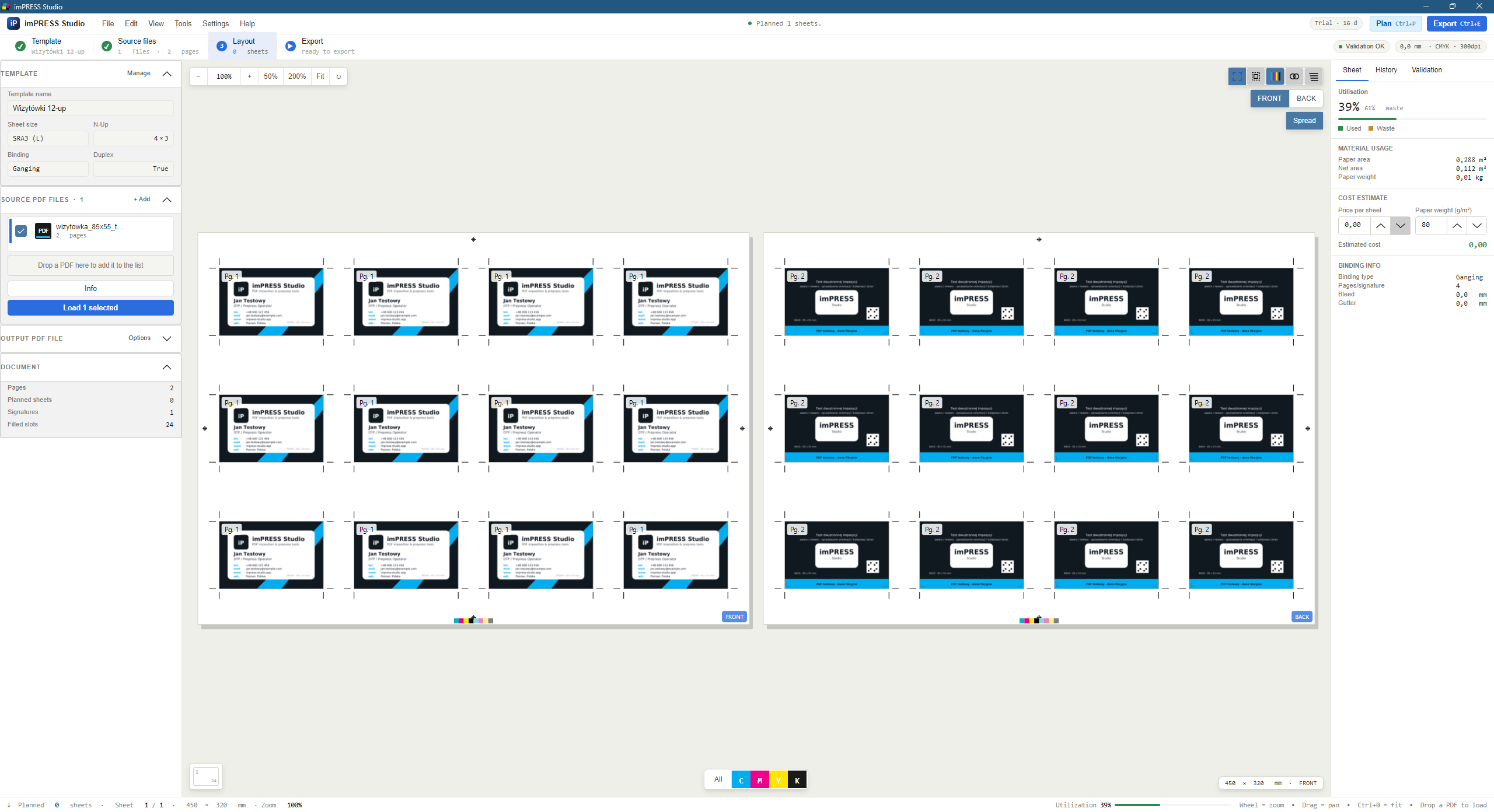
Cursor-anchored zoom, pan, rotation, thumbnails, spread view, front/back toggle — all in real time.
Printer marks
Crop marks, registration marks, CMYK color bars, fold marks, slug info — configurable thickness and offsets.
4 binding types + roll-fed
Saddle stitch, perfect bound, folding (Z-fold, accordion), and roll-fed (step-and-repeat). Automatic signatures and page matching.
Creep compensation
Automatic content shift compensating for paper thickness in nested signatures. Visualized in preview.
PDF/X-4 export
ISO 15930-7 compliance packaged natively by the imPRESS Export Engine — OutputIntent, XMP metadata and vector RGB→CMYK conversion through an ICC profile (ISOcoated, FOGRA, sRGB), with no Ghostscript. Since 1.5.12 X-1a and X-3 are packaged by the native engine too: they are defined on PDF 1.4, so inert transparency constructs (fully opaque groups, /ca 1, Normal blend) are removed by the engine itself, while a file whose transparency actually paints is refused by name rather than silently flattened.
Batch CLI
Automate imposition in PowerShell scripts or run the hot folder daemon (imPRESS Studio.exe hotfolder run). One template, hundreds of PDFs.
Job statistics & quotes
Paper area, usage, waste, estimated cost from grammage and per-sheet price — quote-ready in seconds.
Auto-updates
Built-in update channel via GitHub Releases. Latest fixes and features delivered silently in the background.
Gallery
See the app in action
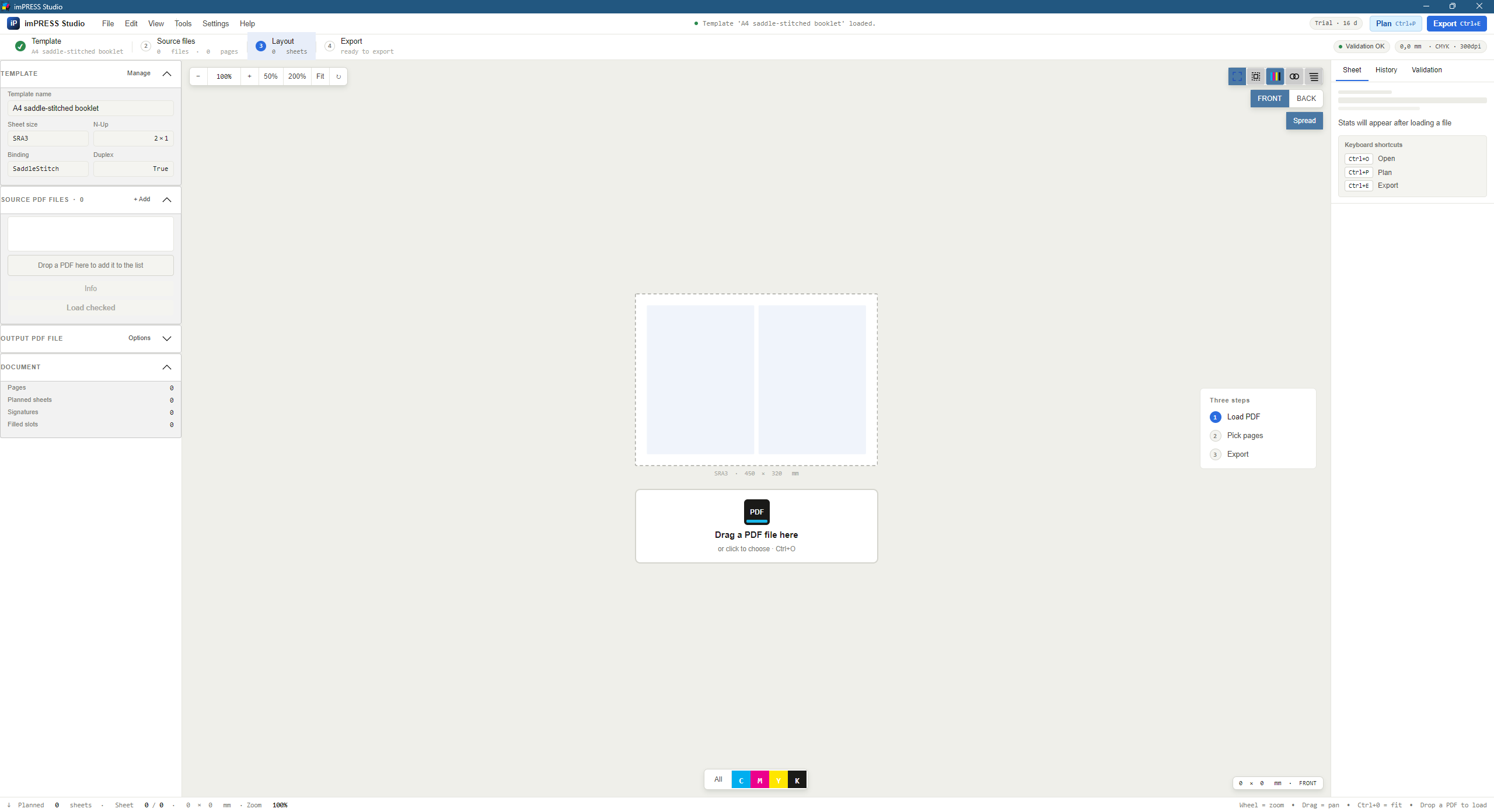
A clean interface designed for intensive prepress work — click any screenshot to enlarge.
In the app open the License activation window. Copy the ID with the Copy button, or save it with Export JSON… as a .lic file.
Fill in the form below — the generator signs a license, the activation key appears on screen (and is also emailed if SMTP is configured).
In the app go to Help → Activate license and paste the key.
ℹ️
A note about installing on Windows
imPRESS Studio is independent, self-published software. Because we don't pay for expensive
corporate Microsoft certificates, Windows SmartScreen may show a blue warning
when you launch the installer. How to run it? Click “More info”, then “Run anyway”.
We guarantee the application code is 100% safe and free of malware.
The data controller is imPRESS Studio. We retain this data only for license issuance and abuse prevention
(up to 3 years after the trial expires). For details on how to exercise your GDPR rights, see the
Privacy policy.
Help
5-step quick start
Full manual at Help. Below: shortest path to your first imposition.
1
Pick a template
Open the template manager and pick a preset (e.g. A5 booklet — saddle stitch).
2
Load a PDF
Drag & drop on the window or hit Ctrl+O. You can merge multiple files.
3
Plan imposition
Press Ctrl+P. The app lays out pages per template.
4
Review preview
Browse sheets, toggle marks, check creep and front/back alignment.
5
Export
Press Ctrl+E. Pick sheet range, ICC profile and optionally PDF/X-4.
Complete technical documentation and operator's manual
The full documentation set for version 1.6.0 — read it in the browser or download the PDF. Document edition: 6 September 2026.
Complete technical documentation
22 chapters: architecture, the full template reference (every JSON field), nine binding types including fold geometry, margins and printer marks, creep compensation, preflight, PDF/X export, the CLI, a glossary and the version history.
A practical guide for the press floor: loading a PDF, choosing a template, checking the sheet, exporting and running hot folders. Richly illustrated with screenshots and finished-sheet examples.
The complete changelog of all 52 releases — exactly what changed in each version, with the cause and the effect of every fix. A Polish version of the page is at changelog.html.
Don't see your question? Check the full FAQ or write to us.
What's new in version 1.6.0?
Version 1.6.0 (September 2026) brings three threads together. Hot folders read CIP4 job tickets — JDF 1.x and XJDF 2.x — so finished size, press sheet, binding and sidedness arrive from the MIS instead of being retyped; a ticket overrides only what it states and the folder’s template stays. Hot folders also install as a Windows service, with a domain account for network folders and restart on failure. Preflight grew by ten checks — page rotation, encryption, PDF version against the target, title and XMP, line-art resolution, the All separation that prints on every plate, plate count — by two file repairs, and by rebuilt report windows. Earlier 1.5 releases added native packaging of all three PDF/X standards, live template preview and validation, fold geometry derived from the product, and prepress preflight with profiles for five press types. Full list: What’s new 1.6.0, the changelog, or Help → What’s new.
Who is imPRESS Studio for?
Digital and offset print shops, prepress departments, DTP studios, advertising agencies, photographers preparing albums and self-publishing authors. It replaces expensive InDesign / Acrobat plugins with a dedicated imposition engine.
Can I try it before buying?
Yes — a 30-day Trial license with full functionality, no watermarks. Email impress_studio@proton.me for a key (typical turnaround: 24 hours).
What are the system requirements?
OS: Windows 10 or 11 (64-bit)
Runtime: .NET 8 (self-contained, no separate install)
RAM: 4 GB minimum, 8 GB recommended
Disk: ~200 MB + space for PDFs
Optional: Ghostscript 10+ — no PDF/X standard requires it; useful only for files with live transparency exported to X-1a / X-3
Where can I download imPRESS Studio?
The latest release is on GitHub Releases. Download imPRESS_Studio-Setup.exe and run the installer. The app then auto-updates from the same source.
Is there a multi-seat discount?
Yes. For 3+ seats we offer volume discounts and managed deployment. Contact us for a tailored quote.
Do you provide updates?
Yes. The first 12 months of updates are included. The app checks for new versions automatically and installs them silently. After year one you can extend update access for a small annual fee.
Contact
Let's talk about your print shop
Questions about deployment, multi-seat pricing, or customizations? We respond within 24 hours.